找到
60
篇与
幽默的小刘吖
相关的结果
- 第 2 页
-
![[typecho主题开发]typecho常用的语法和变量](https://img1.zhuxu.asia/img/2025/06/9405.gif) [typecho主题开发]typecho常用的语法和变量 准备开发一个typecho的主题的第一步,先了解typecho常用的语法和变量,开发typecho主题之前需要有前端三件套基础,会点简单的PHP,开发typecho就是这么简单 网站名称 <?php $this->options->title() ?>网站地址 <?php $this->options ->siteUrl(); ?>网站标题 <?php $this->archiveTitle([ 'category' => _t('分类 %s 下的文章'), 'search' => _t('包含关键字 %s 的文章'), 'tag' => _t('标签 %s 下的文章'), 'author' => _t('%s 发布的文章') ], '', ' - '); ?><?php $this->options->title(); ?>网站说明 <?php $this->options->description() ?>文章或者页面的作者 <?php $this->author(); ?>作者头像 < ?php $this->author->gravatar('40') ?>作者邮箱 <?php $this->author->mail(); ?>上一篇与下一篇调用代码 <?php $this->thePrev(); ?> <?php $this->theNext(); ?>RSS地址 <?php$this->options->feedUrl(); ?>
[typecho主题开发]typecho常用的语法和变量 准备开发一个typecho的主题的第一步,先了解typecho常用的语法和变量,开发typecho主题之前需要有前端三件套基础,会点简单的PHP,开发typecho就是这么简单 网站名称 <?php $this->options->title() ?>网站地址 <?php $this->options ->siteUrl(); ?>网站标题 <?php $this->archiveTitle([ 'category' => _t('分类 %s 下的文章'), 'search' => _t('包含关键字 %s 的文章'), 'tag' => _t('标签 %s 下的文章'), 'author' => _t('%s 发布的文章') ], '', ' - '); ?><?php $this->options->title(); ?>网站说明 <?php $this->options->description() ?>文章或者页面的作者 <?php $this->author(); ?>作者头像 < ?php $this->author->gravatar('40') ?>作者邮箱 <?php $this->author->mail(); ?>上一篇与下一篇调用代码 <?php $this->thePrev(); ?> <?php $this->theNext(); ?>RSS地址 <?php$this->options->feedUrl(); ?>
-
[无需信用卡]白嫖免费的Office 365 E3 Developer订阅,包含5T网盘空间 最近Office 365 E3 Developer又可以免费订阅了,我去试了一下,成功白嫖到,接下着我会用最简洁的方法教大家。 白嫖教程 创建一个空全局管理员 注册链接: 点这里进入 上面的注册链接是国区。如果要换区请改完参数再访问,如country=us是注册美区。不过如果你只有支付宝的话,建议就用国区的 然后邮箱可以自定义xxx@xxx.onmicrosoft.com,接着填写好个人信息,然后纳税人识别号就是身份证号码,用自己亲戚或者朋友的就行 到信用卡那步直接关掉页面,不用管他 不用管信用卡图片 25个许可数量的 E3 Developer 点这里进入 然后扩容的话自己去SharePoint管理的设置,找到OneDrive的上限,把1024改成5120就5个T了,注意是每人5TB,25个人加起来125TB以此类推! 5T图片 最后就是续费的事了,可以把月付改成年付,在账单那边看订阅,这样省事一点 E3 Developer包含哪些主要功能和服务? 由于它基于商业版 E3,你几乎可以获得 E3 的所有核心服务: Office 桌面应用程序:可以安装并激活最新版的 Word、Excel、PowerPoint、Outlook 等(仅限在开发租户内的用户使用)。 Exchange Online:企业级邮箱和日历服务。 SharePoint Online:内容协作和网站平台。 Microsoft Teams:完整的团队协作中心。 Azure Active Directory:用户身份和访问管理。 Microsoft Graph API:访问以上所有服务的统一编程接口。 Power Platform:包括 Power Apps、Power Automate 和 Power BI 的开发者权益。 安全与合规中心:可以探索数据丢失防护、信息保护等高级功能(部分最顶级功能可能受限)。
-
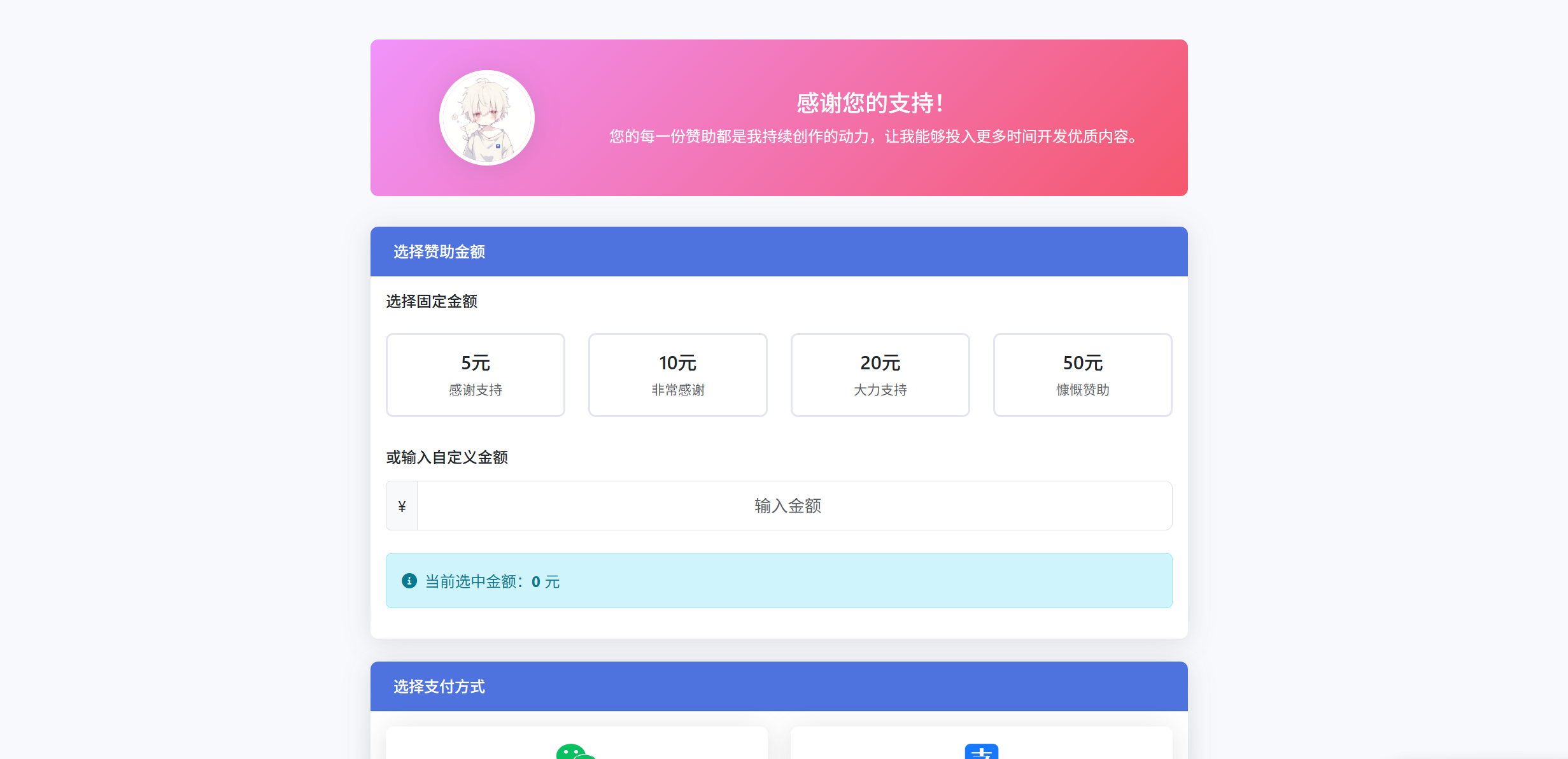
赞助作者页面集成彩虹易支付源码分享 今天突发奇想准备写一个在线打赏作者的网页,所以我找ai帮我生成了一个,下面我就来分享给大家。 这是一款基于Bootstrap 5和彩虹V1易支付官方SDK的现代化赞助作者页面,部署非常简单,虚拟主机也可以搭建。 效果图1图片 效果图1图片 功能特点 🎨 基于Bootstrap 5的响应式设计 💰 支持固定金额和自定义金额 🔗 集成彩虹易支付V1协议 📱 支持微信、支付宝、QQ钱包、云闪付 🎯 支付成功自动弹窗感谢 📦 开箱即用,配置简单 源码下载 简单打赏作者v1.0.2 下载地址:https://github.com/xiaoliu1775qwe/rewardme 提取码: 安装使用 克隆项目到您的服务器 配置您的商户信息 修改通知地址为您自己的域名 访问 index.php 即可使用 配置说明 在 lib/epay.config.php 中配置: $epay_config['apiurl'] = '您的支付接口地址'; $epay_config['pid'] = '您的商户ID'; $epay_config['key'] = '您的商户密钥';在 epayapi.php 中配置: $notify_url = "https://改成你的域名/notify_url.php"; //需http://格式的完整路径,不能加?id=123这类自定义参数 //页面跳转同步通知页面路径 $return_url = "https://改成你的域名/return_url.php"; //需http://格式的完整路径,不能加?id=123这类自定义参数
-
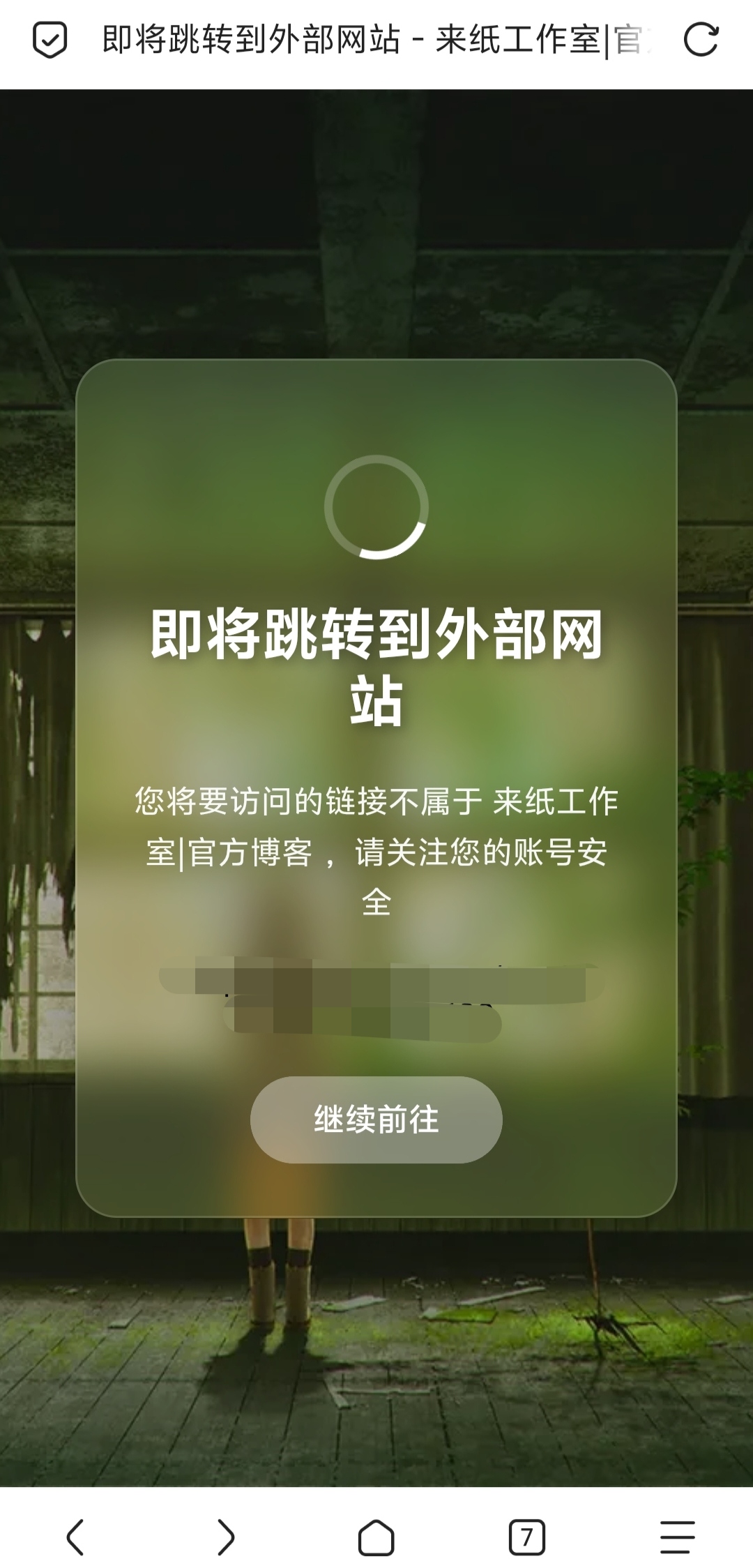
修改Joe再续前缘主题跳转界面美化教程 由于Joe再续前缘主题1.34版本中的跳转界面外部引用css文件失效,导致这个界面显示异常 跳转界面图片 于是我找ai帮我生成了一个跳转界面,下面我就分享给大家,直接复制粘贴即可,修改usr/themes/Joe/module中的goto.php文件 效果图 效果图图片 修改前的goto.php代码 <?php if (!defined('__TYPECHO_ROOT_DIR__') || empty($_SERVER['HTTP_HOST'])) { http_response_code(404); exit; } ?> <!DOCTYPE html> <html lang='zh-CN'> <head> <meta name="referrer" content="no-referrer"> <title>即将跳转到外部网站 - <?= Helper::options()->title ?></title> <meta content='noindex, nofollow' name='robots'> <meta charset='utf-8'> <link rel="shortcut icon" href="<?= Helper::options()->JFavicon ?>" /> <meta content='width=device-width, initial-scale=1, minimum-scale=1, maximum-scale=1.0, user-scalable=no' name='viewport'> <link rel="stylesheet" media="all" href="https://cn-assets.gitee.com/assets/external_link/app-cdbd476d857bfad8751f35a067840adf.css" /> </head> <body> <div class='gitee-external-link-wrapper'> <img class="logo-img" src="<?= Helper::options()->JLogo ?>" alt="Logo black" /> <div class='content-box'> <div class='content-title'>即将跳转到外部网站</div> <div class='content-text'>您将要访问的链接不属于 <?= Helper::options()->title ?> ,请关注您的账号安全。</div> <div class='content-link'> <div class='external-link-href'></div> </div> <div style="background:#409eff" class='ui button orange external-link-btn'>继续前往</div> </div> </div> </body> </html> <script> window.is_black = false; (function() { var e = document.querySelector(".external-link-href"); // var t = window.atob(new URLSearchParams(location.search).get("url")); var t = `<?= $location ?>`; if (t && (e.innerText = t, !window.is_black)) { var n = document.querySelector(".external-link-btn"); n && n.addEventListener("click", function() { window.location.href = t }) } }()); </script>修改后的goto.php文件 <?php if (!defined('__TYPECHO_ROOT_DIR__') || empty($_SERVER['HTTP_HOST'])) { http_response_code(404); exit; } ?> <!DOCTYPE html> <html lang='zh-CN'> <head> <meta name="referrer" content="no-referrer"> <title>即将跳转到外部网站 - <?= $this->options->title ?></title> <meta content='noindex, nofollow' name='robots'> <meta charset='utf-8'> <link rel="shortcut icon" href="<?= $this->options->JFavicon ?>" /> <meta content='width=device-width, initial-scale=1, minimum-scale=1, maximum-scale=1.0, user-scalable=no' name='viewport'> </head> <body> <style> * { margin: 0; padding: 0; box-sizing: border-box; font-family: -apple-system, BlinkMacSystemFont, 'Segoe UI', Roboto, Oxygen, Ubuntu, Cantarell, sans-serif; } body { min-height: 100vh; display: flex; justify-content: center; align-items: center; background: linear-gradient(rgba(0,0,0,0.3), rgba(0,0,0,0.3)), url('https://t.alcy.cc/fj') center/cover fixed; padding: 20px; } .container { background: rgba(255, 255, 255, 0.15); backdrop-filter: blur(12px) saturate(180%); -webkit-backdrop-filter: blur(12px) saturate(180%); border-radius: 20px; padding: 40px; max-width: 600px; width: 90%; text-align: center; box-shadow: 0 8px 32px rgba(0, 0, 0, 0.2); border: 1px solid rgba(255, 255, 255, 0.15); } h1 { color: #fff; margin-bottom: 20px; font-size: 2.2em; text-shadow: 2px 2px 6px rgba(0, 0, 0, 0.3); } p { color: rgba(255, 255, 255, 0.95); line-height: 1.6; margin: 15px 0; font-size: 1.1em; } .time { color: #FFD740; font-weight: 600; font-size: 1.2em; margin: 20px 0; text-shadow: 1px 1px 2px rgba(0, 0, 0, 0.2); } .loader { width: 50px; height: 50px; border: 4px solid rgba(255, 255, 255, 0.2); border-top-color: #fff; border-radius: 50%; margin: 20px auto; animation: spin 1s linear infinite; } @keyframes spin { to { transform: rotate(360deg); } } .external-link-btn { background: rgba(255, 255, 255, 0.25); color: #fff; border: none; padding: 12px 30px; border-radius: 30px; font-size: 1em; cursor: pointer; margin-top: 20px; transition: all 0.3s ease; backdrop-filter: blur(4px); font-weight: 500; } .refresh-btn:hover { background: rgba(255, 255, 255, 0.35); transform: translateY(-2px); box-shadow: 0 4px 12px rgba(0, 0, 0, 0.15); } @media (max-width: 480px) { .container { padding: 25px; } h1 { font-size: 1.8em; } p { font-size: 1em; } } </style> <div class="container"> <div class="loader"></div> <h1>即将跳转到外部网站</h1> <p>您将要访问的链接不属于 <?= $this->options->title ?> ,请关注您的账号安全</p> <div class='content-link'> <div class='external-link-href'></div> </div> <button class="ui button orange external-link-btn">继续前往</button> </div> </div> </body> </html> <script> window.is_black = false; (function() { var e = document.querySelector(".external-link-href"); var t = window.atob(new URLSearchParams(location.search).get("url")); if (t && (e.innerText = t, !window.is_black)) { var n = document.querySelector(".external-link-btn"); n && n.addEventListener("click", function() { window.location.href = t }) } }()); </script>
![[typecho主题开发]typecho常用的语法和变量](https://wmimg.com/i/1892/2025/12/69323a818602f.png)


![[无需信用卡]白嫖免费的Office 365 E3 Developer订阅,包含5T网盘空间](https://img1.zhuxu.asia/LightPicture/2025/11/99cbaac4f2a7de3f.jpg)